The Advice from Vanguard approach
Good advice starts with choosing the right advice, so we help participants understand all of their options before making a decision. Participants and plan sponsors can both benefit from Vanguard’s seamless and intuitive advice experience. From education and tools to detailed reporting, our service puts relevant resources right at their fingertips.
See how participants interact with our advice
6 minutes 31 seconds
Welcome to this demonstration of the Advice from Vanguard suite. Advice from Vanguard is a great solution for plan sponsors who want to offer their participants a powerful set of tools—not just to plan for retirement, but to take control of their overall financial future. Let’s jump right in, starting from the homepage. There are a number of ways that participants can find advice information if they’re looking for it, or be presented with advice content if it makes sense based on what they’re looking for. Our overarching goal is to match participants with the right level of support for their needs, regardless of whether there’s a paid service involved. Participants can navigate to the Financial Wellness Hub for free tools, tips, and insights, or they can explore advice services. For those who are unsure, our advice decision tool can help align them with the right service for their needs.
The advice decision tool helps investors answer two questions: first, is advice a good fit for them; and second, if yes, which advice service best meets their needs and preferences?
Once a participant has completed the seven plain-talk questions, they’ll see a best-fit recommendation of either Digital Advisor, Personal Advisor, or “a little advice if you need it,” which is more of a self-directed approach. We’ll look at what a participant experiences when exploring Digital Advisor.
One way that Advice from Vanguard is different from others is that we require personalization prior to signing up. We believe that participants get the most value out of advice when it is tailored to their specific needs. Along the way, I’ll show you the clear, actionable recommendations and analysis we provide for free prior to enrollment.
First, we start by gathering some key information about the participant. Next, we assess the participant’s risk attitude.
We guide users through three questions with dollar amounts that are personalized for their specific financial situation so the experience feels realistic and applicable. The questions cover long-term retirement income variability, as well as potential shorter-term portfolio gains and losses. This approach allows us to derive participants’ risk tolerance and loss aversion—key inputs to our glide path methodology—as well as assess the consistency of their answers. The participant is then shown their assessed risk attitude, target asset allocation, and proposed glide path. We have now gathered the key inputs necessary to place each investor on one of over 1,000 possible personalized glide paths. There’s more to do from a retirement goal-planning perspective, and we give the choice to finish that process later. To show you the full experience, I’ll customize now. Digging deeper into the participant’s financial situation, we ask about current income and spending. If participants are unsure about their current monthly spending, they can use our expense worksheet to help inform their answers. The investor confirms which Vanguard accounts they’d like to include in their retirement goal—both retirement plans and any personal retail assets. They can also link outside accounts for cash-flow planning purposes, either with an automated data feed or by manually adding the information.
The participant confirms their contributions to non-employer plan accounts and then to the employer-sponsored plan. Here is where it all comes together, with Vanguard delivering the participant’s personalized Financial Outlook based on our 10,000 simulations. Good news: this participant is well funded, meaning they are projected to have assets left over in at least 85% of the simulations. This screen is also a powerful financial planning tool, as participants can edit any of the inputs and see in real time what impact the changes have on their retirement goal projection, as well as use our Social Security claiming optimizer. Once the participant has settled on a plan that suits them, they’ll confirm the goal, preview the recommended asset mix and glide path, and then begin the path to enrolling in Digital Advisor. Participants are prompted to confirm which accounts they would like managed. Only accounts enrolled in the service will be actively managed and have fees assessed, while those left unselected or listed as not ready to enroll can still be used for cash-flow planning purposes. The last step before enrollment is an investment preview. To showcase Vanguard’s active and index advice capabilities, we give participants the option to explore an active/index mix or use an all-index portfolio. To proceed with an active/index mix, we walk the investor through three questions to assess how willing they are to tolerate periods of underperformance, also known as active risk tolerance. Their answers determine how much active management Vanguard would potentially recommend for their portfolio. Based on their answers, we show, account by account, exactly what funds and ETFs we will buy—with specific dollar amounts—to achieve the target asset allocation in the most tax-efficient way. If the investor decides against the active/index mix, they can always click over to the all-index portfolio instead. After reviewing an estimate of the advisory fees during and after the 90-day fee waiver, the participant clicks Continue. The participant can then enroll in Digital Advisor and proceed to their Digital Advisor dashboard. So everything we’ve reviewed to this point—their personalized Financial Outlook, Social Security claiming guidance, proposed target asset allocation, and fund-level portfolio construction preview—was all available to them free of charge, without having to enroll in Digital Advisor. Going forward, this is the screen they’ll see when logging on to their vanguard.com account, with their Financial Outlook and retirement goal listed front and center. Be sure to check out the other videos to see what the experience looks like post-enrollment.
Select and personalize
Our Advice Decision Tool and online education center provide participants with the resources they need to determine if advice is right for them.
3 minutes 29 seconds
Once a participant is enrolled in Digital Advisor, a broad menu of financial planning tools becomes available to them. Let’s take a look at a few. This participant already created a retirement goal during the enrollment process, and we see that on their Digital Advisor dashboard, but they likely have some other financial goals. So, I’m clicking Add a Goal. I’m going to select higher education, home purchase, out payment, and car down payment. Once I enter the goal amounts and dates, I can edit the planned contributions and see the four goals mapped along the retirement timeline. I can also see how Vanguard will adjust the managed investments to ensure the participant is invested appropriately for each goal. I’m back to the dashboard, and the four goals are now sitting side by side, but the client is only moderately funded for her house and underfunded for higher education and the car. That’s where goal optimizing comes in. Goal Optimizer helps assess what changes could be made to get all goals to well-funded status. The tool uses machine learning to explore millions of possible scenarios and identify four potential actions: increase contributions, retire later, reduce non-retirement goal amounts, or reduce retirement expenses. For example, clicking the light bulb icon next to goals, this participant could make some minor changes to their target goal amounts, and by doing so, all four goals are now well funded. Back to the dashboard again, and the participant is feeling good. She now has four goals that are all well funded, and she’s wondering what to do next to get the most possible value from Digital Adviser. That’s where the Next Steps tool can be useful. The Next Steps tool shows what she has done so far, what she has snoozed, and serves up a few suggested actions, ranging from education to setting up automated transactions to put her goal savings on autopilot. Another key financial wellness topic Digital Adviser can help with is emergency savings, or what we call a rainy day tool. This tool is based on proprietary Vanguard methodology that helps investors move beyond rules of thumb to determine, one, how much they should have saved for different kinds of emergencies; two, where to save the money; and three, whether they’re on track or not. It uses accounts the participant has aggregated or manually entered, leverages an AI model to estimate her likelihood of job loss and potential duration of unemployment, then presents a recommended range of emergency savings amounts. The investor chooses the amount that’s most comfortable to her. Then the tool helps her determine how much should be in cash for the most short-term needs and how much can be in accessible investments for longer-term needs. Finally, Rainy Day Tool assesses whether the participant is on track or not, and if not, which accounts could be adjusted across both cash and accessible investments. Let’s wrap up back on the dashboard. There’s more we haven’t covered yet, but I’ll save it for another time. Instead, I’ll conclude on the tools and resources menu to give a sense for some of the other features, such as the debt payoff calculator, the healthcare cost estimator, and the Medicare Match tool. Thanks so much for your time and for your interest in Advice from Vanguard.
Manage multiple goals
Participants can access scenario-modeling tools, financial guidance, and education resources to implement tax-optimized, personalized financial plans throughout their lifetimes. With Advice from Vanguard, they can tackle their most pressing financial needs, including:
- Saving for education or emergencies.
- Paying down debt.
- Meeting multiple nonretirement goals.
- Optimizing Social Security.
Dedicated resources for plan sponsors
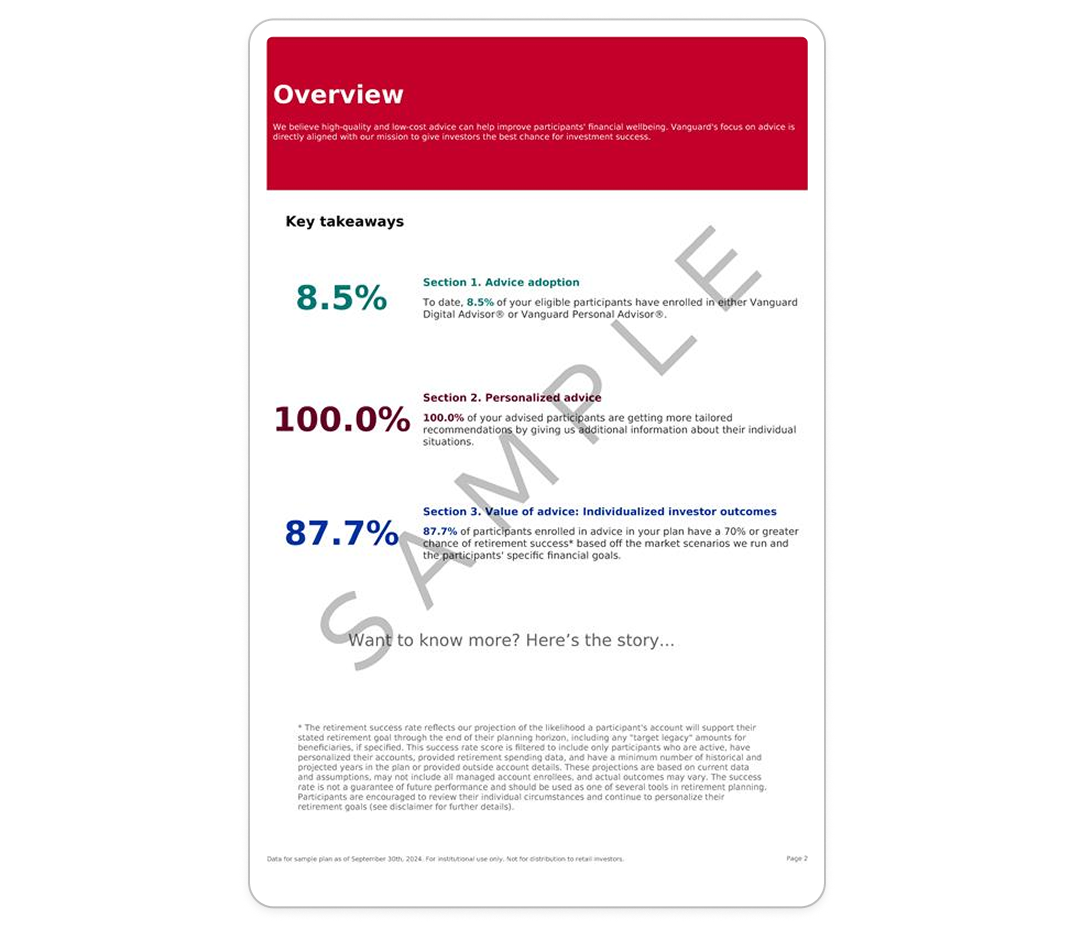
Plan sponsors receive comprehensive reporting that allows them to track use of the participant advice services while also making their required fiduciary oversight process easier.
Access to high-level statistics, such as:
- Assets under management.
- Participant demographics.
- Eligible and enrolled participants.
More detailed reporting, including on:
- Personalization rates.
- Outcomes for advised versus nonadvised participants.
Vanguard’s workplace retirement division has a team of advice experts who educate plan sponsors and consultants on the continually improving capabilities and outcomes that stem from our offerings. Advice from Vanguard is embedded and integrated into Vanguard’s retirement plan platform, providing a consistent experience within the Vanguard site.


Advice is provided by Vanguard Advisers, Inc. (VAI), a federally registered investment advisor. Eligibility restrictions may apply. VAI cannot guarantee a profit or prevent a loss.